
API Access#
1. API Token Generation#
To use the MailTrigger HTTP API, you must first generate an API Token. Follow these steps:
Log in to MailTrigger and click the user avatar at the top right → User Settings.
From the sidebar, click API Tokens.
Click Generate New Token: - Name (optional): Provide a label to identify this token. - Click Create.
The system will display the newly created token only once. Be sure to copy and store it securely.
If lost, go back to the API Tokens list, click Revoke for the lost token and generate a new one.
2. Authentication (No Username/Password Support)#
All MailTrigger API requests require authentication via API Token. Username and password are not supported.
HTTP Headers Include the following headers in every API request:
Authorization: Bearer <YOUR_API_TOKEN>
Content-Type: application/json
Example
curl -X GET https://app.mailtrigger.app/v1/domains \
     -H "Authorization: Bearer abcdef1234567890" \
     -H "Content-Type: application/json"
Error Responses - Missing or invalid tokens will result in HTTP
401 Unauthorized. - Expired or revoked tokens may return401or403 Forbidden.
Note
API Tokens grant full access to your account. Never expose them in public code or frontend environments.
For automated or scheduled access, store tokens securely in environment variables or a secrets manager.
MailTrigger API Reference#
Available APIs#
The list below highlights the most commonly used public APIs. For complete endpoint details, request/response schemas, and all parameters, please refer to the Swagger documentation.
Note
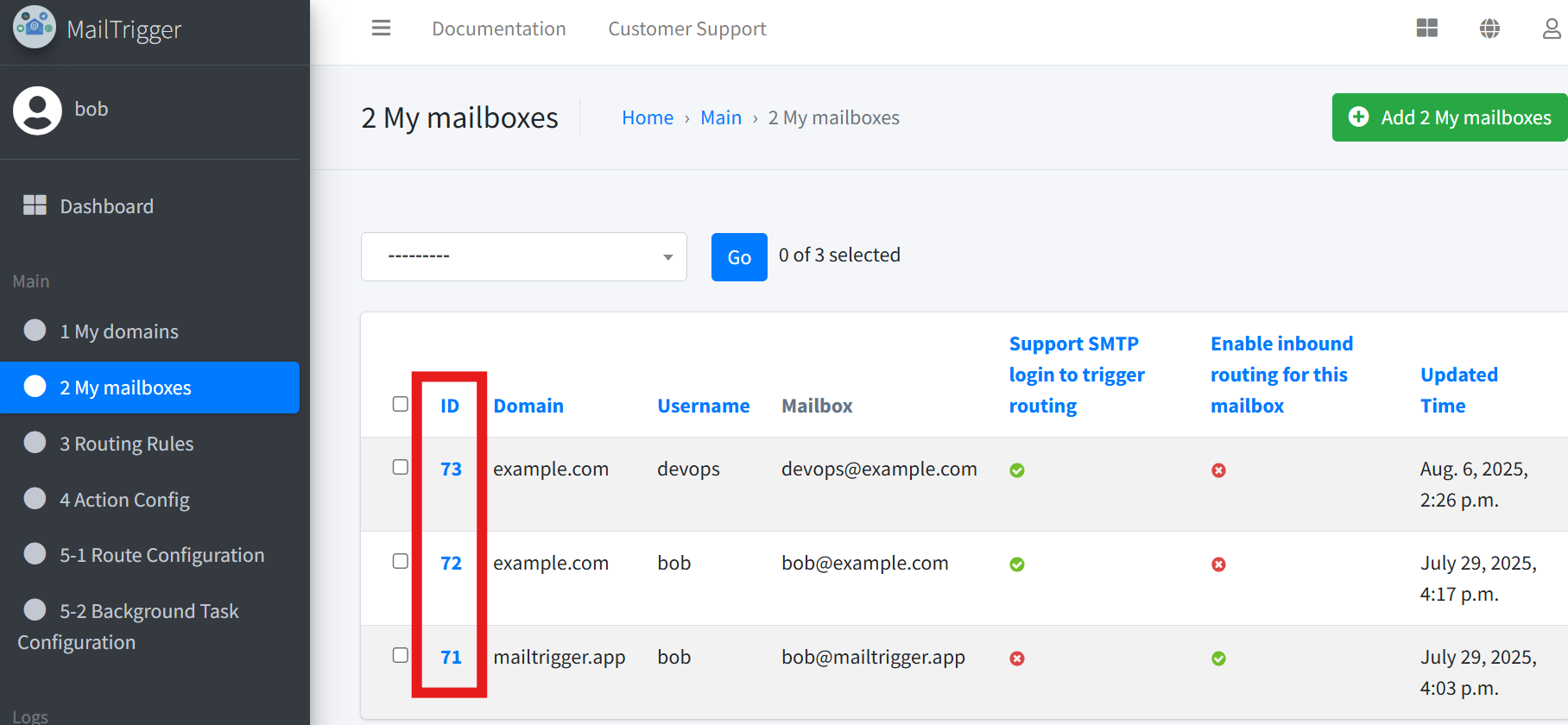
For all endpoints that require an {id} (such as mailbox id, domain id, or rule id),
you can find the corresponding ID directly in the MailTrigger web interface.
For example, to find a mailbox id, go to Mailboxes, then you will see the mailboxes list. The mailbox IDs will be shown on that page.
Note
MailTrigger provides a full API documentation. Please log in to your account and visit:
https://app.mailtrigger.app/swagger/
There you can browse all available APIs and see detailed specifications, including request/response formats and parameter definitions.
DOMAINS#
/api/v1/domains/
List existing domains or create a new domain.
/api/v1/domains/{id}/
View, update, or delete a specific domain.
MAILBOXES#
/api/v1/mailbox/
List mailboxes or create a new mailbox.
/api/v1/mailbox/{id}/
View, update, or delete a specific mailbox.
/api/v1/mailbox/{mailboxId}/archives/
Browse archived emails for a mailbox.
/api/v1/mailbox/{mailboxId}/data/
Read or manage custom mailbox data used by rules and actions.
/api/v1/mailbox/{id}/logs/
Read mailbox processing logs.
/api/v1/mailbox/{id}/testmail/
Send a test message for route verification.
/api/v1/mailbox/{id}/mail/send/
Send email directly through the specified mailbox.
RULES#
/api/v1/rules/
List or create rule definitions.
/api/v1/rules/{id}/
View, update, or delete a specific rule.
ACTIONS#
/api/v1/actions/
List or create action configurations.
/api/v1/actions/{id}/
View, update, or delete a specific action.
/api/v1/actions/{id}/parameters/
View the configurable parameters for an action.
ROUTES#
/api/v1/routes/
List or create routes that connect rules and actions.
/api/v1/routes/{id}/
View, update, or delete a specific route.
TASK-CONFIGS#
/api/v1/task-configs/
List or create background task configurations.
/api/v1/task-configs/{id}/
View, update, or delete a specific task configuration.
/api/v1/task-configs/{id}/action/execute/
Manually trigger the action of a background task.
Additional Notes#
Authentication is required for all API usage.
Access is restricted to mailboxes owned by the authenticated user.
When Would I Need to Use These APIs?#
Common use cases:
Build a route via API Create an action, define rules, connect them with a route, then use test mail and logs to verify the flow.
Manage mailbox data Query mailbox archives, send mail through a mailbox, or maintain mailbox-specific data for automation scenarios.
Run background automation Use task-config APIs to manage scheduled jobs and manually trigger task actions when needed.
For advanced endpoints, detailed request formats, and optional parameters, refer to Swagger.